

Walk-in clients
Create and complete a bill for a walk-in without forcing the team through an unnecessary booking journey.
Checkout & payments
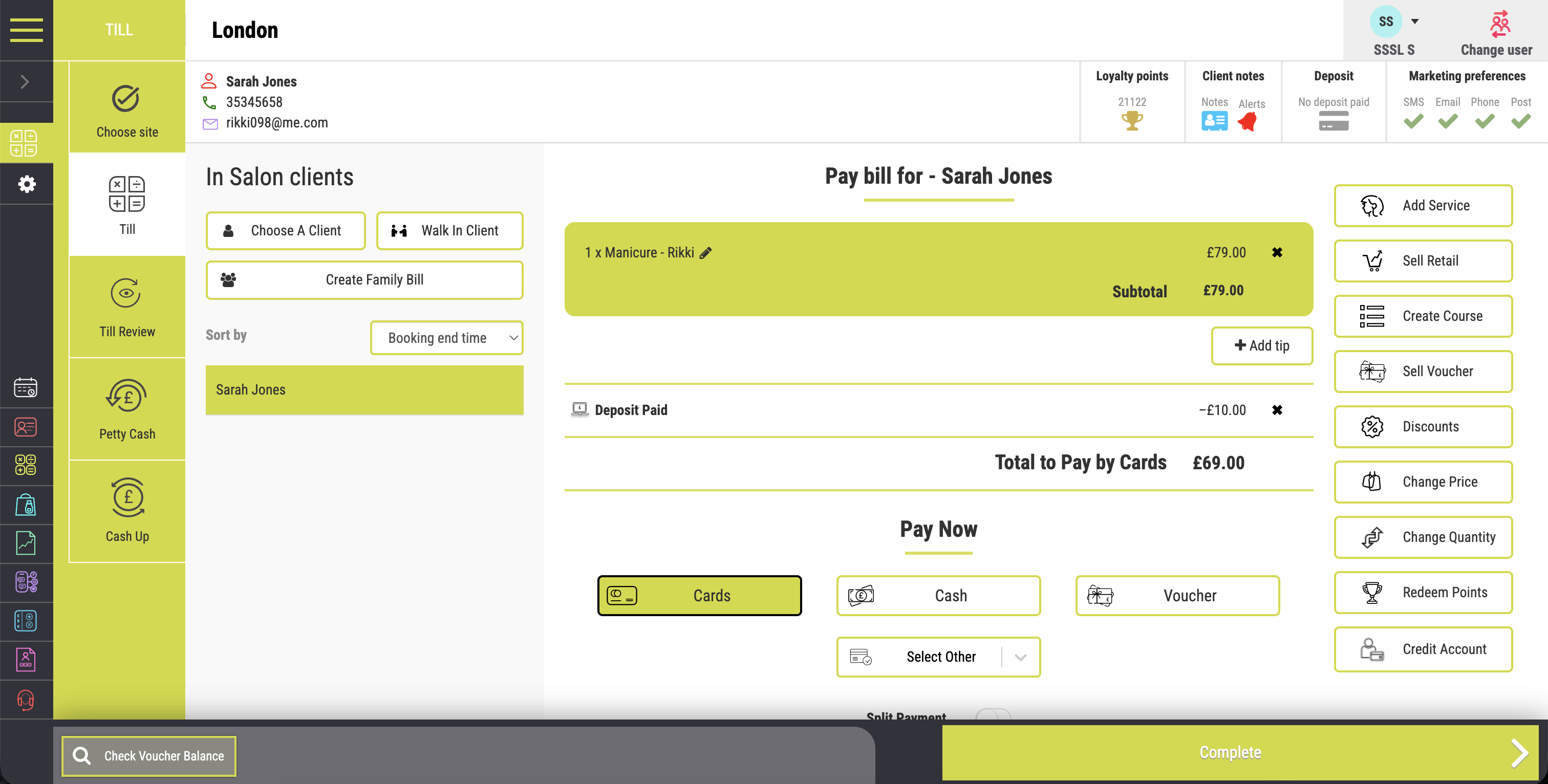
Salon Manager software connects services, retail products, deposits, gift vouchers and payment types in one checkout. Your salon POS software links the bill with the client record, stock and reporting. Handle split payments, family bills and walk-in purchases, then keep the information your team needs for commissions and payroll reporting.
A personal walkthrough • UK support • No obligation
Built around the working day
The end of a visit should feel as considered as the appointment itself. Your team may need to add a product, apply a deposit or split a bill between card and voucher. Connected checkout keeps those details with the sale instead of creating another reconciliation job later.
Finish every visit with the same care it began. Connected salon POS software helps your team prepare a clear bill, apply deposits and handle the client’s chosen payment. Our all-in-one software links salon payment processing, stock and reporting, giving premium salons and multi-location managers a clearer view of each sale.
One clear bill. A connected business record.
An online salon management system connects the visit, sale and payment. Your salon booking software and salon CRM provide the appointment and client context at checkout. Retail sales can update stock records, while sales information supports reporting and commission calculations.
See how this connects with your SalonPay payment options.
The tools your team will use
Create and complete a bill for a walk-in without forcing the team through an unnecessary booking journey.
Bring purchases for linked family members together when one person is paying.
Apply authorised discounts, adjust a price when required or redeem available loyalty points within the same checkout.
Sell salon gift vouchers from the till or online and record the value received.
Redeem vouchers against the correct bill and keep the remaining balance clear.
Sell prepaid treatment courses and connect the purchase to the client record.
Place an authorised balance on the client’s account when they will pay at a later date.
Apply any deposit already paid, then send the correct remaining total to the supported payment terminal without retyping it. Connected salon POS software keeps salon payment processing close to the final bill.
Record tips by team member and keep payment types and daily totals easier to reconcile.
Use service and retail sales information for commission tracking and payroll reporting. Review the relevant reports for your team and payment arrangements.
From features to everyday work
| Example | At checkout | What remains connected |
|---|---|---|
| Deposit paid before the visit | Apply the existing deposit to the final bill. | The deposit, remaining balance and sale. |
| Voucher plus card | Redeem the available voucher value and take the balance. | The redemption and each payment type. |
| A family appointment | Bring the relevant family purchases together. | The client purchases and shared payment. |
| Walk-in product purchase | Create the sale without a booked service. | The product movement and sales record. |
Payment services, rates and hardware depend on the agreed setup. SalonPay offers net or gross settlement. Ask for a quote based on your card mix, turnover and current costs.
Make it work your way
Bring in the services, retail products and relevant client or family purchases. Apply deposits, authorised discounts and vouchers.
Use your configured payment methods, including split payments where needed. Supported terminals receive the correct total without retyping.
Keep the transaction linked to clients, stock and team sales. Use payment totals and reports for cash-up and review.
Salon software UK
The best salon software for checkout should handle the bills your team actually needs to process. Test a normal visit and a less common bill. Check split payments, vouchers, deposits and the sales record. Compare the complete payment cost, including terminal charges and contract terms, rather than a headline transaction rate alone.
When comparing salon software for groups, check how each location’s sales and payments appear in reporting.
For the wider salon software system, compare packages and inclusions and see the full feature range.
An AI salon receptionist can help clients arrange appointments by phone. Your team then handles the visit and bill through the connected checkout.
Frequently asked questions
Clear answers about checkout & payments, before you choose your setup.
Have a workflow we have not covered? Talk it through in your demo.
Build your connected salon
Review integrated card payment options and costs.
Connect retail checkout with product quantities.
Follow sales, commission and payment information.
Your salon. Your workflows.
We will show a deposit, retail purchase, split payment or family bill, then follow the transaction into the reports your team uses.


