
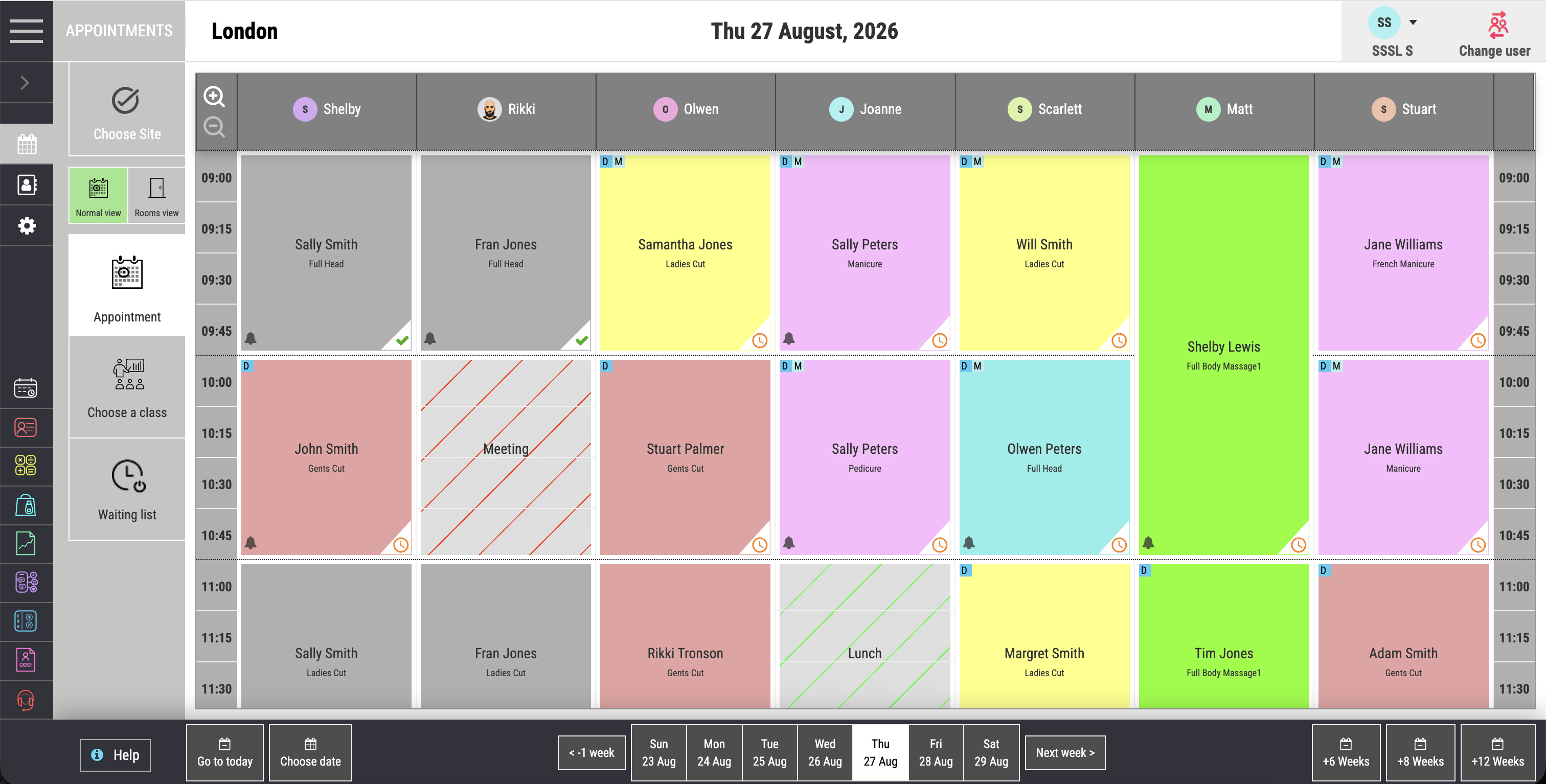

Colour-coded appointment diary
See staff, services, rooms and appointment status clearly. A colour-coded calendar helps reception understand the day at a glance.
Appointments & scheduling
Salon Manager software brings appointments, staff, rooms and processing time into one live salon diary. Your team can manage appointments and waiting lists without checking separate schedules. Connect online booking, confirmations and reminders to the same availability. Built for hair and beauty salons, with booking rules that reflect how your team works.
A personal walkthrough • UK support • No obligation
Built around the working day
A colour appointment is more than a start time. It can involve processing, a finishing service and a second team member. A beauty treatment may need a room or equipment. Your salon appointment software should account for these details before reception offers a time.
Protect the time your team needs to deliver a great appointment. Connect service timings, room availability and team cover in your all-in-one software. Premium salons can plan a calmer working day, use waiting lists to fill gaps and make rebooking easier. Multi-location managers keep the workflow suited to each salon.
The right appointment. The right person. The time to deliver it.
Give reception a clear view of the day, then carry each booking through to the client record and checkout. The diary is part of our online salon management system. Connect it with salon booking software for clients booking online, or an AI salon receptionist for routine appointment calls.
See how this connects with your client record.
The tools your team will use
See staff, services, rooms and appointment status clearly. A colour-coded calendar helps reception understand the day at a glance.
Keep availability updated across devices and locations, reducing the risk of clashes and double bookings.
Allow clients to book online through your website or branded mobile experience, even when the salon is closed.
Set durations, processing time, availability and suitable team members around the way each service is delivered.
Send SMS or email confirmations and reminders to help reduce no-shows, late cancellations and forgotten visits.
Prompt clients to rebook and make it easier for your team to secure the next appointment before they leave. Use client history to plan the next visit.
Keep track of clients looking for an appointment. When a gap opens, your team can review interested clients rather than starting a fresh search.
Track rostered hours, holidays, sickness and lateness alongside your team’s working patterns. Keep staffing information close to the diary it affects. Salon rostering software helps you review team cover alongside attendance, sickness, holidays and rostered hours.
From features to everyday work
| Booking need | What to configure | Why it matters |
|---|---|---|
| Colour and finishing services | Service duration, processing time and suitable team members. | Show time that your team can actually deliver. |
| Rooms and equipment | The resources needed for each service. | Keep the appointment and required space aligned. |
| Staff availability | Rostered hours, holidays and other unavailable time. | Offer appointments around the team you have. |
| Cancellation protection | Reminders, deposits or card capture where configured. | Make your policy part of the booking journey. |
Online booking is optional with Essentials and included from Premium. SMS costs 6p to 8p per message, with bundles or pay-as-you-go. Deposits and card capture require online booking and a suitable payment setup.
Make it work your way
Set durations, processing time, suitable team members, rooms and resources. Check each service against a normal working day.
Set working hours, online availability and payment requirements. Agree confirmation, reminder and cancellation settings.
Book a colour service, move an appointment and review a waiting list. Check what the team and clients each see.
Salon software UK
Test a real service from first booking to checkout. Can the system handle processing time, resources and a change of team member? Then check the waiting list, reminder costs and what happens when a client moves an appointment.
For the wider salon software system, compare packages and inclusions and see the full feature range.
Choosing the best salon software starts with your own services, team and client journey. A familiar test appointment is more useful than a long feature checklist.
When comparing salon software for groups, test how central reception finds availability and books an appointment at the right location.
Frequently asked questions
Clear answers about appointments & scheduling, before you choose your setup.
Have a workflow we have not covered? Talk it through in your demo.
Build your connected salon
See the account-free journey your clients use.
Connect appointments with preferences and client history.
Send service-specific forms before the visit.
Your salon. Your workflows.
Bring a colour appointment, room booking or difficult scheduling scenario. We will show how your services, team and timings work together.


